RASPBERRY PI
Streamlined Raspberry Pi Access Via USB
Discover how a new feature in Raspberry Pi OS simplifies headless setup and internet sharing through a direct USB connection.
- Read time
- 5 min read
- Word count
- 1,176 words
- Date
- Jan 25, 2026
Summarize with AI
A new feature in Raspberry Pi OS, based on Paul Oberosler's rpi-usb-gadget, simplifies headless Raspberry Pi setup by enabling SSH over USB. This eliminates common network configuration challenges. The system allows a host machine to recognize the Pi as a network adapter, facilitating direct SSH access and internet sharing. Users can enable gadget mode via Raspberry Pi Imager, though Windows hosts require an additional driver for full functionality. This innovation promises to make initial Pi setup significantly more straightforward.
🌟 Non-members read here
Revolutionizing Raspberry Pi Headless Setup with USB
Configuring a headless Raspberry Pi—a device without a monitor, keyboard, or mouse—often presents unexpected challenges for users. What should be a quick process frequently turns into a lengthy troubleshooting session, particularly when dealing with network configurations. Traditional methods typically involve setting up Wi-Fi and Secure Shell (SSH) access before the Pi is even powered on, a process prone to various pitfalls.
Complex network environments, such as those secured with Protected EAP, can be particularly difficult to navigate, leading to hours of failed attempts. Even experienced users have found themselves resorting to less conventional methods, such as SSH over Bluetooth, to gain initial access. However, a significant advancement is set to simplify this entire process, making headless Pi setup considerably more user-friendly.
This breakthrough comes in the form of a new package, developed by Paul Oberosler, which enables SSH connectivity directly over a USB cable. This innovative solution, now integrated into the latest iterations of Raspberry Pi OS, promises to streamline initial setup and minimize the frustrations associated with network-dependent configurations. It represents a substantial improvement for anyone regularly working with Raspberry Pi devices in a headless capacity.
The integration of this USB-based SSH functionality means that a direct connection to a host machine can now serve as the primary conduit for initial setup and management. This approach bypasses the complexities of wireless network provisioning entirely, offering a robust and reliable alternative. As Raspberry Pi continues to be a popular choice for embedded projects and server applications, such an enhancement is poised to have a widespread positive impact on its user base.
Streamlined Connectivity with rpi-usb-gadget
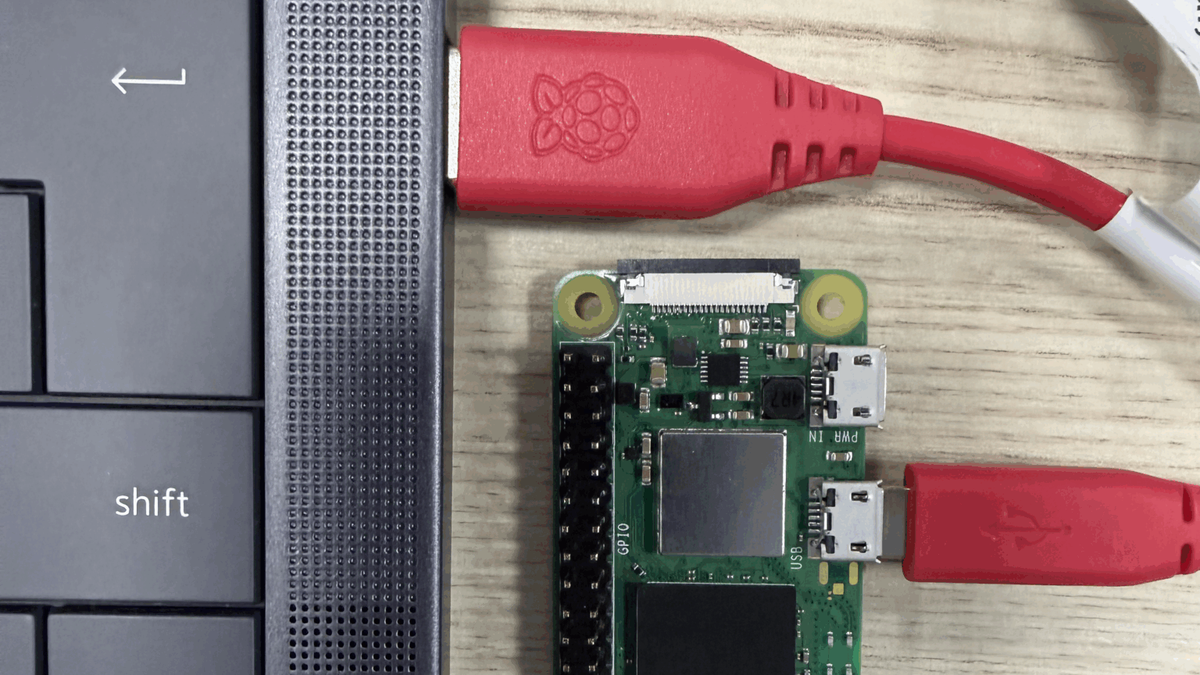
At the core of this new functionality is the rpi-usb-gadget package, which transforms a Raspberry Pi into a network adapter when connected to a host machine via USB. In this “gadget mode,” the Raspberry Pi presents itself as a network host on the USB connection, allowing the host computer to establish an SSH connection directly to it. This eliminates the need for the Pi to be connected to a traditional Wi-Fi or Ethernet network for initial configuration.
A key benefit of this setup is the ability to leverage the host machine’s internet access for the Raspberry Pi through Internet Connection Sharing (ICS). This means that once the USB connection is established, the Pi can download updates, install packages, and access online resources without needing a separate internet connection. This feature is particularly useful during the initial setup phase, where internet access is often critical for installing necessary software and dependencies.
Enabling gadget mode is a straightforward process, integrated directly into the Raspberry Pi Imager tool. Users can select this option during the initial OS flashing process, ensuring the USB port functions as both a power input and a network port. It is important to note that when in gadget mode, the selected USB port will not function as a host port for other peripherals, maintaining its dedicated role for network communication.
While the setup is largely plug-and-play, Windows users will need to install an additional driver to fully utilize the Internet Connection Sharing feature. This minor extra step ensures full compatibility and unlocks the complete range of benefits offered by the rpi-usb-gadget solution. Despite this, the overall process remains significantly simpler and more reliable than traditional headless setup methods, especially for those who frequently work with new Raspberry Pi units.
Operational Details and Configuration
Implementing SSH over USB involves a few key steps, primarily centered around configuring the Raspberry Pi in gadget mode. The process begins with the Raspberry Pi Imager, the official tool for flashing operating systems onto SD cards. Within the Imager’s advanced settings, users can enable the USB gadget mode, which configures the Raspberry Pi’s USB port to function as a network interface. This option sets up the necessary drivers and network settings on the Pi side.
Once gadget mode is enabled and the Raspberry Pi OS is written to the SD card, the user simply inserts the card into the Pi and connects it to a host computer via a USB cable. The host computer should then recognize the Raspberry Pi as a new network adapter. On most Linux and macOS systems, this recognition is automatic, and the Pi will appear as an accessible network device. For Windows users, a specific driver typically needs to be installed to ensure the system correctly identifies and communicates with the Pi over the USB network.
After the host computer recognizes the Raspberry Pi as a network device, an SSH connection can be established using standard SSH client software. The Raspberry Pi will typically be assigned a default IP address within a private subnet, which the host can use to connect. With SSH access, users can perform all necessary configuration tasks, install software, and manage the Pi as if it were connected via a traditional Ethernet or Wi-Fi network, but with the added convenience of a direct, reliable USB link.
The Internet Connection Sharing feature further enhances this setup by allowing the Raspberry Pi to leverage the host computer’s internet connection. This is particularly useful for initial updates and software installations without needing a separate network connection for the Pi. Configuring ICS varies slightly depending on the host operating system, but generally involves enabling sharing on the host’s primary internet connection and directing it through the USB network adapter connected to the Pi.
Evolution of USB Connectivity for Raspberry Pi
The concept of using USB for advanced Raspberry Pi connectivity is not entirely new, but the rpi-usb-gadget package represents a significant refinement and official integration. Older methods, such as utilizing USB On-The-Go (OTG) mode, have been employed for various purposes, including simplifying complex network configurations. For instance, OTG mode has previously been used to enable a single Raspberry Pi to function simultaneously as an access point and a client, demonstrating the versatility of USB-based networking.
These earlier applications often required more manual configuration and a deeper understanding of Linux networking principles. The rpi-usb-gadget solution, by contrast, aims to standardize and simplify this process, making it accessible to a broader audience. Its inclusion in Raspberry Pi Imager underscores a commitment to improving the out-of-the-box experience for users setting up headless devices. This evolution reflects a growing demand for more robust and user-friendly initial setup procedures.
Beyond basic headless access, the implications of streamlined USB connectivity extend to various development and deployment scenarios. For embedded systems or projects where a reliable and isolated network connection is preferred, USB SSH offers an invaluable tool. It minimizes reliance on potentially unstable wireless networks or complex router configurations, providing a direct and secure channel for debugging and maintenance.
As the Raspberry Pi platform continues to grow in popularity for everything from educational tools to industrial applications, enhancing the initial setup experience is crucial. This new approach to SSH over USB not only addresses long-standing frustrations but also paves the way for future innovations in how users interact with and manage their Raspberry Pi devices. It marks a significant step forward in making advanced features more approachable for all users.